
The Reality of In-Store Execution in India
An in-store promoter app & In-store management app for Indian brands help companies track promoter attendance, monitor shelf execution, and capture real-time store data across thousands of outlets.
In the Indian retail market, the in-store promoter app is often referred to by different names depending on the industry and business use case, such as counter consultant apps, POSM apps, merchandising apps, assisted selling apps, in-shop promoter apps, sales promoter management apps, or product promoter apps. Despite the different terminology, the core objective remains the same: improving visibility and control over in-store execution.
In India, where retail spans over 12–14 million kirana stores, approximately, managing last-mile execution is fundamentally more complex than in most global markets. Yet many brands still rely on WhatsApp, Excel sheets, or manual reporting – leading to poor visibility, missed sales, and inconsistent execution.
In brands that rely on in-store promoters, merchandisers, or assisted-selling teams, a significant portion of their in-store execution activity often remains unverified. Their Promoter visits are logged but rarely validated. Schemes reach distributors, but don’t always translate to on-shelf execution. Displays are approved at HQ but are missing where it matters – inside the store. This gap directly impacts conversion at the point of sale and leads to measurable leakage in promotional ROI.
Research indicates that up to 70–90% of stockouts are caused by in-store execution gaps rather than supply issues, directly impacting sales and customer loyalty. – Retail Stockout Research Overview by Wikipedia
Industry research from firms like NielsenIQ and retail execution studies consistently shows that gaps in in-store execution lead to significant revenue loss at the shelf. Even a small percentage of stockouts can result in billions in lost sales, as consumers either switch brands or move to another store.
And still, when the Monday morning review happens, the answers to the most basic questions remain unclear: Was the promoter present? Was the shelf set up correctly? Did the scheme run in-store?
If your brand is relying on calls, messages, or end-of-day reports to answer these, you’re already experiencing the problem.
Why In-Store Execution Needs a System, Not Just People
For all such challenges, brands are moving towards structured systems—using in-store promoter apps to bring discipline into execution. These tools give teams a digital way to check in, execute tasks, and capture proof in real time.
Brands operating promoter-led retail execution today are building structured systems instead of relying only on manual coordination. And that means pairing promoter-side tools with a powerful in-store management app that gives managers, area heads, and HQ teams a live view of what’s happening across every store, every day.
Despite the growth of e-commerce, most purchase decisions in categories like FMCG and consumer goods still happen in-store, as reflected across industry reports by FICCI and EY India. The shelf, the promoter’s interaction, and the display remain the final moment of truth.
That’s where an in-store promoter app and an in-store management app come in. Whether it’s improving promoter productivity, ensuring shelf visibility, or driving secondary sales, the right system directly impacts revenue outcomes.
This guide will help you understand both, in a simple and practical way. By the time you finish reading, you will understand:
- What an in-store promoter app does and who it’s built for
- What an in-store management app is and how it’s different
- The must-have features in each, and why they matter
- How the two apps work together as a connected retail execution ecosystem
- What to consider when choosing the right solution
- Pricing models and leading apps in India
- How these tools help drive better in-store execution and ROI
This guide is written for brand managers overseeing field activation, retail operations heads managing store networks, FMCG and consumer goods sales leaders, and IT teams evaluating in-store sales management solutions. If your role depends on knowing what’s happening inside a store, this will give you clarity.
Table of Contents
What Is an In-Store Promoter App for FMCG India? (Complete Explanation)
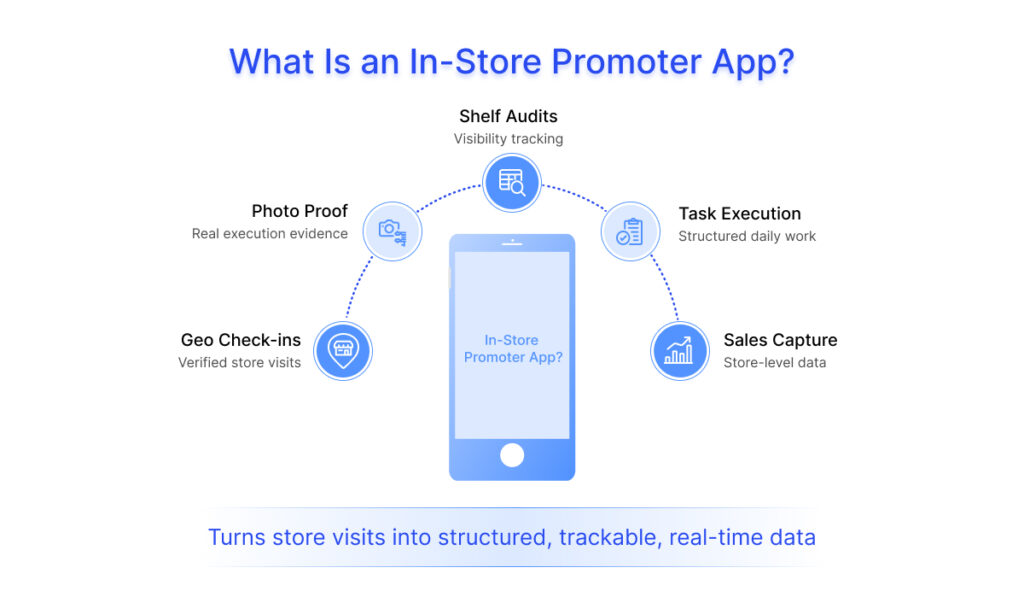
An in-store promoter app for FMCG brands in India is an application used by product promoters to manage, track, and report retail execution activities in near real time. It acts as a guided digital tool that shows what needs to be done inside the store and captures what happens on the ground.
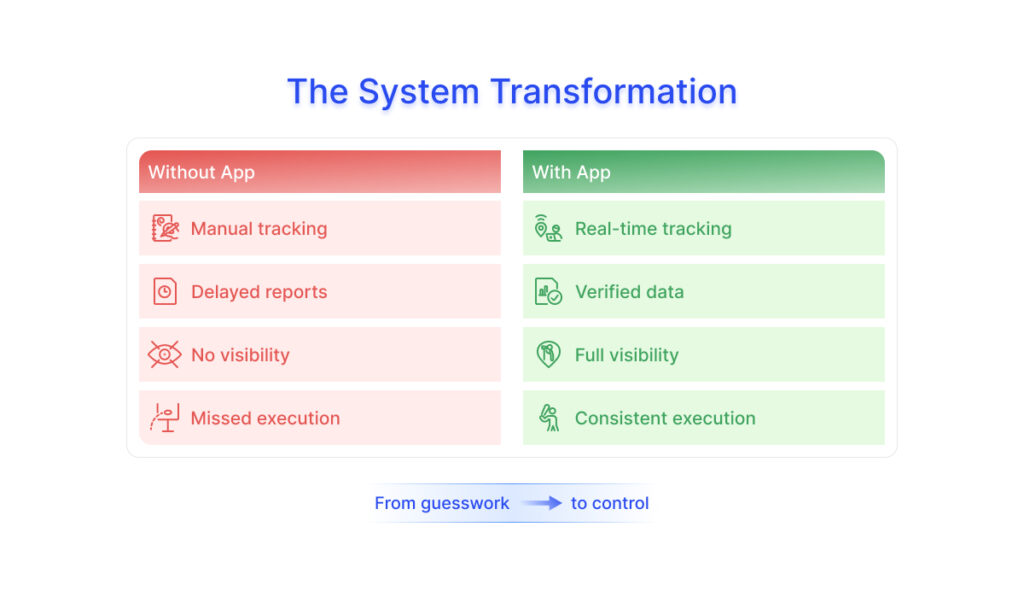
For brands using in-store promoters, the absence of a structured system often leads to visibility tasks being skipped or inconsistently executed. This creates a clear gap between planned execution and what actually happens in-store. This difference becomes more visible when you compare operations before and after implementation:
Operation | Before Implementation | After Implementation |
Reporting | 3 days delay | Same day |
Visibility | Assumption-based | Photo-based |
Execution | Inconsistent | Standardized |
Ground Reality: What Actually Goes Wrong
In practice, execution rarely goes as planned. On the ground, teams face issues like:
- Fake or repeated photo uploads to close tasks quickly
- Retailers refusing photos due to privacy or store policies
- Scheme communication mismatching with actual distributor billing
- Promoters sharing phones with other promoters to mark their attendance across different stores.
These challenges are exactly why companies are moving towards In-store retail tracking software solutions that bring structure, visibility, and accountability to field operations.
Promoters often work on entry-level devices, and some of the stores operate in low or no-network environments. This makes offline capability critical, ensuring that daily tasks, audits, and data capture continue without interruption.
However, functionality alone is not enough. Regional language support also plays a key role in adoption, especially for large, distributed product promoter teams.
Beyond technology and adoption challenges, retail execution in India is complex. With kirana stores, modern trade, and quick commerce coexisting, each format demands a different execution approach.
In practice, this means an effective promoter app must be simple to use, lightweight, work reliably offline, and adapt to the realities of on-ground retail execution in India.
What Does an In-Store Sales Promoter App Do? Core Functions Explained
An in-store Sales promoter app enables field teams to capture, record, and report store-level activities as they happen, replacing manual reporting with a guided workflow. In practice, this includes the following core functions:
Attendance & check-ins
Every store visit begins with a geo-tagged attendance, time-stamped check-in. The app uses GPS to confirm the promoter is physically present at the assigned outlet. This single feature alone eliminates one of the most persistent and costly problems in In-shop promoter management: fraud attendance. Check-out is equally logged, giving managers an accurate record of time spent per store. This makes it one of the most effective promoter attendance trackingapp with GPS capabilities available today.
Activity tracking
Once checked in, field promoters or merchandisers receive structured store-level tasks assigned for that store visit, which products to focus on, which schemes to communicate, which displays to verify, etc. Every task is marked complete within the app, with mandatory fields (and often photo proof) ensuring nothing is skipped.
Sales capture at the outlet level
Promoters can log sales figures, record customer interactions, raise purchase orders with distributors, and track scheme redemptions – all without carrying paper forms or calling back to the office. This data feeds directly into sales dashboards, giving the Headquarters (HQ) team a near-real-time picture of sell-through at the store level. This also functions as a secondary sales tracking app for FMCG distributors in India, giving brands near real-time sell-out visibility.
Shelf audits to track product availability and visibility
The promoter tool allows the staff to conduct structured audits by checking stock availability, share of shelf, product placement versus the approved planogram, pricing accuracy, and competitor facings. Photo capture with timestamps makes every audit verifiable, promoting visual merchandising app capabilities. For example, an apparel brand may use this to check visual merchandising compliance across retail chains, while a cosmetic brand may monitor counter visibility and tester placement across beauty outlets. This is where a retail shelf audit app for FMCG field teams becomes critical for tracking availability and visibility. This improves shelf availability monitoring and overall promoter productivity.
Where Is It Used the Most?
In-store execution apps are widely used in industries where in-store visibility, assisted selling, merchandising, or retail execution directly influence sales performance.
For example:
- FMCG brands mainly use them to monitor shelf share, stock availability, and promotional execution.
- Apparel brands mainly track visual merchandising compliance and campaign displays across retail chains.
- Cosmetic and beauty brands majorly monitor counter visibility, tester placement, and promoter activity.
- Consumer electronics brands most of the time track promoter-assisted sales, demo execution, and product displays.
- Footwear and lifestyle brands majorly use them to monitor SKU availability, retail branding, and display consistency.
While these are some of the most common use cases, many other industries also use in-store execution platforms to manage daily retail operations and field execution activities. Brands in these industries often rely on promoter-led retail execution and an assisted-selling team, for consumer goods companies to ensure consistency at the shelf level.
How Is a Promoter App Different from a CRM or a Sales App?
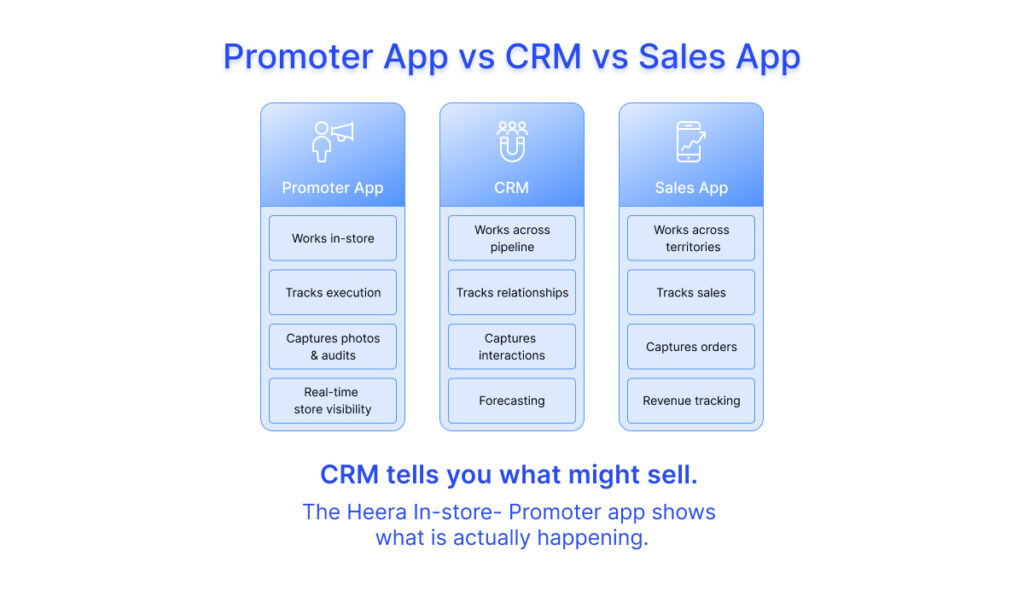
An in-store promoter app is designed for managing and verifying activities inside merchandising retail stores, while a CRM or sales app focuses on managing customer relationships, leads, and sales pipelines across various industries for different operations.
In simple terms, a promoter app shows what is happening on the shop floor, whereas a CRM or sales app tracks what is happening across the business pipeline.
This is exactly why brands often evaluate SFA vs in-store promoter app for FMCG before planning. Here is how they fundamentally differ:
| In-Store Promoter App | CRM / Sales App |
Primary user | Field promoter | Sales rep / account manager |
Primary location | On the shop floor, inside the store | At your convenience |
Core activity | Shelf execution, display compliance, attendance | Pipeline management, deal tracking, client relationship |
Data captured | Photos, shelf audits, task completion, footfall | Leads, opportunities, meetings, follow-ups |
Output for business | Retail In-store execution visibility | Revenue forecasting & client management |
Works offline? | Yes – critical for store environments | Typically, not a core requirement |
This is why many FMCG teams compare the SFA vs in-store promoter app to determine which is better for FMCG before choosing the right solution.
Below you will find a more simplified version of the table in a visual format for better understanding of the concept.
Do You Need a Promoter App if You Already Have an SFA?
This is one of the most common questions brands ask. A Sales Force Automation (SFA) system already tracks field activity, orders, and outlet visits. So, it’s easy to assume that it should also cover in-store execution. But SFA and promoter apps solve very different problems. SFA is built for sales movement. It helps sales reps:
- Take orders
- Track coverage
- Manage distributor interactions
For brands running in-store promoter-led retail operations, a promoter app focuses specifically on execution quality inside the store. It focuses on:
- Whether products are visible on shelves
- Selling in-store
- Whether displays are set up correctly
- Whether brand guidelines are followed inside the store
In many cases, both systems are used together.
The SFA tracks what was sold and where, while the promoter app tracks how the brand is represented at the point of sale.
If your brand relies on visibility, merchandising, or assisted selling inside stores, an SFA alone will not give you that level of control; you will need an In-store promoter app for complete retail execution.
In-store Promoter App vs SFA vs DMS: What’s the Difference for FMCG/CPG Teams?
FMCG/CPG teams often use multiple systems like SFA, DMS, and in-store promoter apps, but each serves a very different purpose. Understanding how they differ is key to building a clear, connected view of sales, distribution, and in-store execution.
As brands scale, multiple systems come into play. This often creates confusion around where each system starts and ends. Here’s a simple way to look at it:
Function | In-store Promoter App | SFA | DMS |
Primary purpose | In-store execution | Field sales tracking | Distributor operations |
Main user | Promoter / merchandiser | Sales representative | Distributor / back office |
Focus area | Inside the store | Route & outlet coverage | Inventory & billing |
Key activities | Shelf audits, display checks, attendance | Order taking, visit tracking | Stock management, invoicing |
Data captured | Photos, compliance, task completion | Orders, collections, visits | Primary & secondary sales |
Business output | Visibility & execution quality | Sales coverage & productivity | Supply chain & stock visibility |
Each system plays a distinct role:
- An in-store promoter app manages last-mile execution inside stores.
- SFA manages field sales movement and order capture.
- DMS manages inventory, billing, and distributor operations.
Together, they create a complete view of distribution and retail execution.
What Is an In-Store Management App? The Command Centre for Product Execution
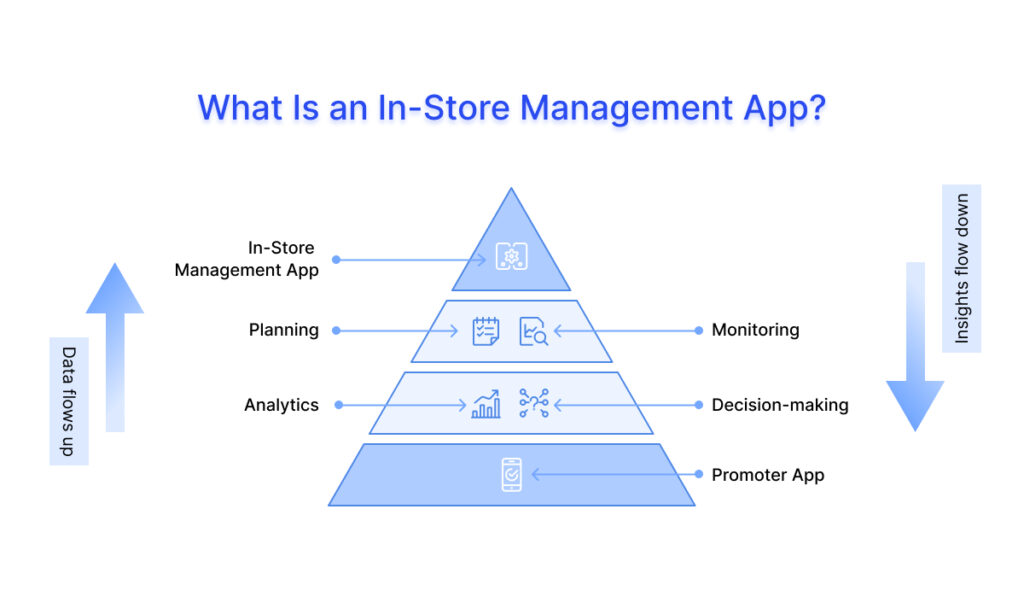
An in-store management app is a platform used by managers and HQ teams to plan, monitor, and control retail execution across all stores in near real time.
If the in-shop sales promoter tool is the eyes and hands on the shop floor, the in-store management app is the brain sitting above it all processing, organising, and making sense of everything happening across every store, every day.
It brings together data from In-store field promoters and converts it into dashboards, alerts, and actionable insights, helping teams track store-level execution, ensure compliance, and make faster decisions without being physically present.
Where the promoter app answers, “what did I do today?”, the management app answers “, what is happening across all my stores right now, and where do I need to act?”
For example, If an Area Manager in a mid-size FMCG company typically manages 8–15 sales store promoters across 40–80 outlets. They spend 2–3 hours every morning just collecting WhatsApp updates, cross-checking attendance, and calling promoters who haven’t reported. This is the pain that an in-store management app solves.
The Scope of an In-Store Management App
An in-store management app covers a wide range of retail execution activities, helping brands move from scattered processes to a structured, trackable system. On the management side, it typically brings together four key areas:
- Store Operations
Plan and control merchandising activities in one place. This includes assigning in-shop promoters to stores, scheduling visits, setting targets, and sharing campaign briefs. What was earlier managed through calls and spreadsheets becomes streamlined and visible.
- Brand & Display Compliance
Define and enforce brand standards like planograms, pricing, and display guidelines. Managers can review images shared by promoters, identify gaps, and assign corrective actions within the same platform.
- Inventory & Stock Visibility
A built-in store audit layer captures stock levels from the field. Managers can quickly spot low or out-of-stock SKUs, act with distributors, and prevent missed sales opportunities.
- Promoter Performance & Accountability
All field data, like attendance, task completion, sales, and audits, is consolidated into one view. This enables better performance tracking, smarter decisions, and more effective in-shop management.
Who Uses an In-Store Management App? The Key Stakeholders
An in-store management app is used by multiple teams, each with a different role in retail execution:
- Store-Level Promoters & Brand Ambassadors
They primarily use the promoter app, but their activity data feeds directly into the management system, creating individual performance profiles.
- Area Managers & Supervisors
The main users of the management app. They plan visits, track promoter activity, monitor compliance, and manage issues across their territory in near real time.
- Regional & Zonal Heads
They use the platform for a broader view, analysing performance across regions, tracking campaign execution, and identifying gaps at a macro level.
- HQ Teams (Brand, Marketing & Sales)
Brand and marketing teams track campaign execution on the ground at the retail store, while sales teams align in-shop field activity with actual sales outcomes. The platform provides near real-time visibility into retail performance.
- IT & Operations Teams
They manage system access, integrations with ERP or DMS, and ensure smooth functioning and data security of the platform.
In-Store Promoter App vs In-Store Management App - A Clear Comparison
The two apps are not competitors – they are two sides of the same system. But they are built for entirely different users, with entirely different needs.
| In-Store Promoter App | In-Store Management App |
Who uses it | Field promoters, merchandisers | Area managers, regional heads, HQ teams |
Where it’s used | Inside the store, on the shop floor | At a desk, in a car, in convenience |
Core function | Task execution, attendance marking, sales capture, shelf audits, photo uploads | Planning, monitoring, performance tracking, analytics, compliance management |
Data Usage | Captures raw store data (activities, images, stock, sales) | Converts field data into insights, reports, and actionable decisions |
Key output | Task logs, photos, check-ins, sales entries | Dashboards, compliance reports, performance scores |
Level | Execution-focused (on-ground activities) | Strategy & control (oversight and decision-making) |
Works offline | Yes – essential | Partially – dashboards need connectivity |
Impact on Business | Improves store-level execution, visibility, and promoter productivity | Improves decision-making, accountability, and overall retail performance |
A promoter app without a management layer just generates data no one acts on. A management app without on-ground input becomes a dashboard of manual, unreliable numbers. They’re meant to work together, and the best retail compliance results come when both are used as one connected system, not standalone tools.
Must-Have Features of an In-Store Promoter App for FMCG/CPG Product Promoter Teams
Understanding what an in-store promoter app is gives you the concept. Understanding its features and workflows helps you confidently evaluate and choose the right solution for your brand.
Two apps can offer the same features but deliver very different outcomes. Some improve in-store execution, while others simply move processes from paper to screen. The difference lies in how well the features are designed and how effectively they work on the ground.
Each feature below answers two questions: what it does, and why it matters. There are eight core feature areas every serious promoter app should cover. Here’s a breakdown of each.
- Task & Visit Management
Promoters receive their daily schedule, beat plan, assigned stores, and tasks directly on the app. It clearly shows the sales representatives where to go, what to do, and in what order.
Why it matters:
Ensures planned store coverage, reduces missed visits, and keeps field activity aligned with business priorities.
- Geo-Tagging & Attendance
Every promoter store visit starts with a GPS-based check-in & check-out, which confirms the promoter is physically at the right outlet. All actions during the visit – like photos, audits, or orders – are automatically linked to the same location and time.
Why it matters:
It significantly reduces fake attendance through geo-tagged attendance check-ins and audit trails. If the promoter is not at the store, they cannot check in. It also shows how much time they spend at each outlet, helping you understand whether tasks are being done properly, not just marked complete.
- Retail Audit & Surveys
Promoters fill structured digital forms during each store visit, capturing stock availability, shelf placement, pricing, POS material presence, planogram compliance, and competitor activity.
Why it matters:
It turns store observations into clear, time-stamped data you can use. This helps you spot gaps between what should be happening and what’s happening in-store, while also giving near real-time visibility into competitor activity and market conditions. - Image Capture & Proof of Execution
Promoters capture photos of shelves, displays, POS materials, and competitor placements as a mandatory part of their tasks. Each photo is automatically tagged with location, time, promoter details, and the related task.
Why it matters:
It turns “the promoter says it was done” into verified, dated, location-confirmed evidence. Managers can remotely review shelf conditions & planogram compliance at any store in near real time – without a single phone call. This ensures brand guidelines and display standards are followed; AI can even flag issues directly from images. - SKU Visibility Tracking
Promoters systematically record which SKUs are present on the shelf, how many facings each has, whether they are positioned correctly, and which products are absent or out of stock. Out-of-stock alerts are triggered automatically and routed to the area manager and distributor for immediate action.
Why it matters:
Improves product visibility and helps identify out-of-stock or low-presence SKUs before they impact sales. - Promotion & Scheme Updates
Promoters receive updates on ongoing schemes, offers, and campaigns directly on the app, tailored to each outlet. The app also tracks whether the promoter has seen the update and whether it was correctly executed in-store, including pricing, communication, and display.
Why it matters:
Keeps promoters up to date without relying on scattered communication, ensuring consistent and correct execution of scheme promotions in-store. - Incentive & Performance Tracking
Promoters can view their targets, daily achievements, sales numbers, task completion, and incentives directly in the app. The dashboard updates in near real time, showing exactly where they stand against their goals throughout the day.
Why it matters:
Makes promoter performance transparent and measurable, increasing motivation and accountability. Promoters know what to do to hit targets, leading to better execution and fewer disputes over incentives. - Offline Functionality
The app works even without internet access. Promoters can complete check-ins, tasks, audits, photo capture, and order entry offline, with all data syncing automatically once connectivity is restored.
Why it matters:
Ensures uninterrupted work in low or no-network areas. This keeps in-shop execution consistent and prevents teams from falling back on manual processes.
Individually, each feature solves a specific problem. Together, they create a system where every store visit is planned, tracked, verified, and measured, giving brands complete control over in-store execution.
Top 8 Key Features of an In-Store Management App
An in-store management app gives managers and supervisors authentic, reliable in-store information that is captured through the promoter app at the store level, while the management app turns that data into insights, actions, and strategic decisions. Here’s a breakdown of essential features:
- Store Visit Scheduling & Digital Visit Reports
Managers can schedule and assign store visits directly in the app – deciding which promoter goes to which store, on what day, and what tasks to complete. When a visit is finished, a digital report is automatically created from the promoter’s in-app activity and is ready for review immediately.
- Territory & Beat Planning
Managers can organise and optimise territory coverage in the app. They assign promoters to specific areas, create daily store routes that save travel time, and easily adjust plans if priorities or promoter assignments change. - Planogram & Display Compliance Audits
Managers can review photos and audit reports from promoters remotely, checking if displays, planograms, POS materials, and pricing are correct. Stores that don’t meet standards are flagged automatically, & corrective tasks can be assigned to promoters directly in the app. - Inventory & Stock Level Visibility
Promoters’ stock updates create a near real-time view of inventory across all stores. Out-of-stock alerts show which store and promoter to follow up with, so managers can act fast. - Promoter Performance Dashboard
Managers can see each promoter’s activity in one place – attendance, check-ins, task completion, audits, sales, and promotions. Performance can be viewed by promoter, store, territory, or rolled up to the region & national levels. - Campaign & Promotion Management
Managers can create campaigns and trade schemes in the app – set details, assign stores, choose dates, and send instructions to promoters. They can track progress in near real time, seeing which stores have received the scheme, which displays are correct, & which stores are recording sales. - KPI Monitoring & Exception Alerts
Managers can track key metrics like store coverage, task completion, scheme execution, & sales vs. targets on near real-time dashboards. The app also sends automatic alerts if something goes wrong – for example, out-of-stock SKUs, missed visits, low compliance scores, or late check-ins with store details and suggested actions. - Secondary Sales Tracking
Sales recorded by promoters – like units sold, orders, and scheme redemptions – are collected on the manager’s dashboard. This gives a daily, detailed view of actual sell-out at each store, broken down by SKU, store, territory, and channel.
How the In-Store Promoter App & Management App Work Together
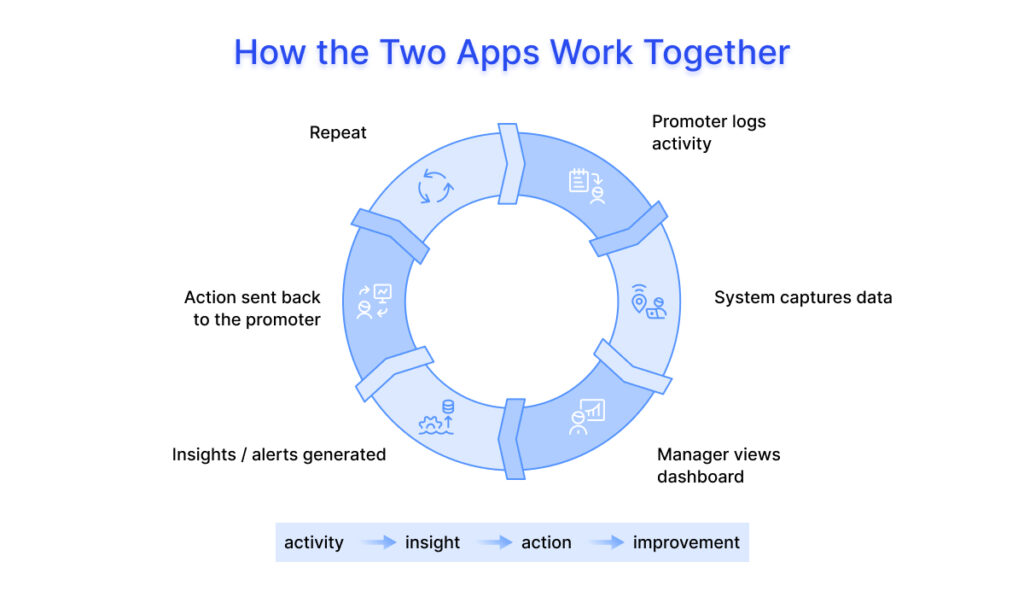
These apps create a seamless connection between product promoters and managers, turning daily activities into actionable insights.
Flow of Data
- Promoter: Records store visits, sales, audits, photos, and scheme execution directly in the app.
- System: Captures and organises all data in near real time, applying location, time, and task context.
- Manager: Views dashboards, performance reports, alerts, and analytics – all updated instantly.
Typical Daily Workflow
- Promoter checks in at the store and completes tasks, records sales, and uploads photos.
- The system logs every action with time and location metadata.
- Managers monitor progress, check compliance, track KPIs, and respond to alerts in near real time.
- In-shop Promoters receive updates, feedback, or new instructions through the app, keeping the retail stores aligned with business priorities.
This integrated workflow ensures transparency, accountability, and faster decision-making across the entire retail operation. Together, they form a connected In-shop sales system that links store activity with decision-making.
A Day in the Life of a Promoter Using the App
To understand how this works in practice, here’s what a typical day looks like for a promoter using an in-store execution app:
9:30 AM → Check-in at first store
The promoter marks attendance using GPS-based check-in, confirming presence at the outlet.
10:00 AM → Shelf audit and task execution
They complete assigned tasks, check SKU availability, verify planogram compliance, and upload photos as proof.
11:30 AM → Detect out-of-stock (OOS)
While auditing, they notice a key SKU is missing and log it in the app.
12:00 PM → Place order / notify distributor
The app enables them to raise a replenishment request or flag the issue for action.
3:00 PM → Manager flags compliance issue
The area manager reviews data in near real time, notices a display gap, and sends corrective instructions.
Throughout the day → Tasks, sales capture, and updates continue
All activity is tracked, time-stamped, and visible to managers without follow-ups.
Instead of scattered calls and delayed reporting, the entire day is structured, trackable, and visible as it happens.
In-Store Promoter App for FMCG India: Business Benefits, ROI & Impact
Features explain what an in-store promoter app or retail execution app does. The business case explains why it matters. For most FMCG and retail brands, the decision isn’t about adding another tool. It’s about fixing execution gaps that directly impact sales, visibility, and operational efficiency at scale. Before looking at the upside, it’s important to understand the downside. This is where investing in retail execution software in India delivers measurable ROI.
- Stop Ghost Attendance & Fake Reports
Problem: Promoters sometimes mark visits they didn’t do, and reports are often written from memory.
Benefit: GPS-verified check-ins make it extremely difficult to fake visits, allowing brands to achieve more productive store coverage without hiring additional staff.
ROI: Converts wasted promoter-days into real execution, recovering lost work and revenue. - Higher Shelf Compliance
Problem: Incorrect product placement, missing displays, or absent POS materials reduce sales.
Benefit: Photo-based audits catch issues daily, not weeks later. Compliance becomes more consistent and reliable over time.
ROI: Better-placed products sell more, boosting revenue directly. - Faster Detection of Out-of-Stocks
Problem: Empty shelves frustrate customers, who often buy competitors’ products.
Benefit: SKU tracking and alerts notify managers instantly, reducing out-of-stock duration.
ROI: Quick restocking recovers lost sales across stores and SKUs. - Less Manual Reporting & Back-Office Work
Problem: Managers spend most of their time chasing reports and consolidating data.
Benefit: Data captured automatically from the app frees managers to focus on coaching and store visits.
ROI: Saves time, reduces errors, and improves decision-making. - Improved Promoter Productivity & Motivation
Problem: Without structure, promoters vary in performance and effort.
Benefit: Daily plans, task guidance, and real-time dashboards motivate promoters to improve task completion.
ROI: More productive promoters mean better execution without increasing headcount.
- Better Trade Promotion Execution
Problem: Schemes often fail at execution – promos don’t reach stores, displays are missing, and pricing isn’t correct.
Benefit: Scheme tracking ensures every promoter knows the campaign, confirms acknowledgement, and executes properly.
ROI: Even a 10% improvement can recover millions in promotional spend.
- Data-Driven Decisions Across the Organisation
Problem: Decisions are often based on delayed or inaccurate reports, not real in-store reality.
Benefit: Near real-time, verified store-level data guides faster, more accurate decisions (depending on connectivity and sync cycles).
ROI: Detecting problems or opportunities sooner protects sales, market share, and improves resource allocation. - Scalability Without Increasing Costs
Problem: As in-store promoter teams grow, management effort and costs usually increase at the same rate. More promoters mean more managers, more reporting, and more coordination.
Benefit: The platform automates reporting, tracking, and monitoring, so managers can handle larger teams and territories without extra effort. Brands can scale promoters without needing the same increase in management staff.
ROI: Reduces the cost of scaling. You can grow your in-shop operations without a matching rise in overhead, making expansion more efficient and profitable.
Comparison of In-Store Promoter Software
Not all tools used for an in-shop sales system are built the same. Many brands start with CRM systems, but these are not designed for in-store execution. The in-shop product promoter app is purpose-built for managing retail activity on the ground.
Here’s how they compare:
Feature | CRM Software | In-Store Promoter App |
Attendance | Manual or self-reported | Geo-tagged attendance, location-verified check-ins |
Reporting | Delayed, manual updates | Near real-time, automated reporting |
Sales Tracking | Limited or indirect | Direct store-level sales tracking |
Task Management | Basic activity logging | Structured tasks with mandatory completion |
Store Audits | Not supported | Built-in audits with photos and data capture |
Visibility | High-level, aggregated | Detailed, store-level visibility |
Integration | Limited to sales data | Connected with field execution workflows |
CRM systems help manage relationships and sales pipelines, but they don’t capture what’s happening in-store. Brand promoter tracking app bridges this gap by giving near real-time visibility into execution, compliance, and sales at the outlet level. (depends on connectivity and sync cycles)
5 In-shop Execution Problems Brands Face Without an In-Store Promoter App
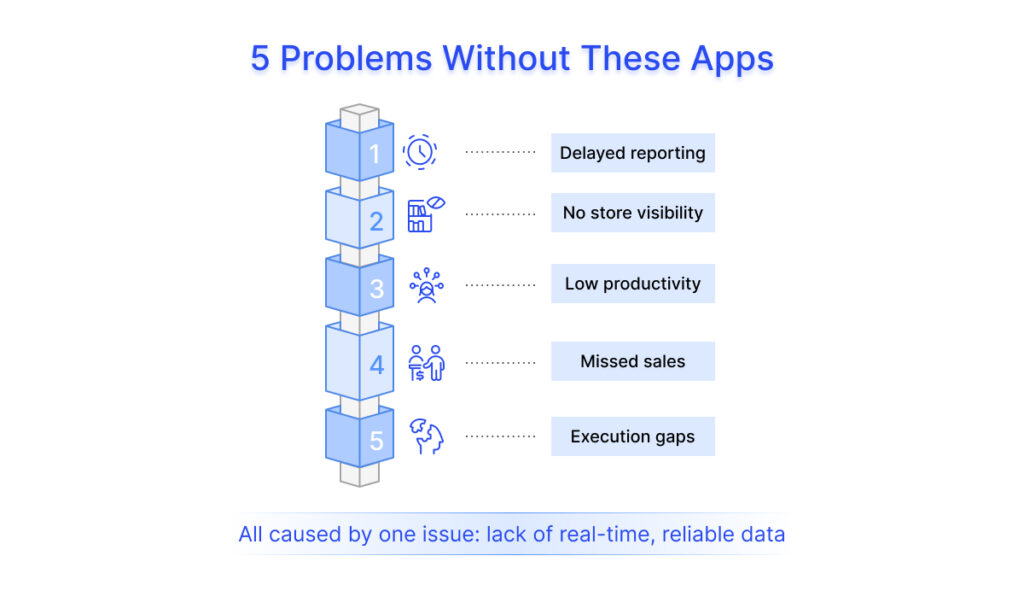
Most in-store execution problems occur when brands start relying on manual processes WhatsApp messages, paper reports, phone calls, and Excel sheets – to manage a distributed field force in the stores. The same six problems appear consistently, regardless of team size or geography. Here is what that looks like in practice.
1. Delayed & Inaccurate Reporting
In-store field data collected manually arrives late, passes through multiple hands, and loses accuracy at every step. By the time a consolidated report reaches a manager or the Headquarters team, it is already 3 to 7 days old – and the decisions made on it are responding to a situation that has already changed.
The real cost: Brands end up managing last week’s problems with this week’s resources. Course correction is always one reporting cycle too late.
2. No Visibility into Store-Level Execution & Promoter Activity
Without an in-store execution system, brands have no reliable way of knowing what is happening on the shop floor between visits. Was the promoter at the store? Was the display set up correctly? Were tasks completed – or just marked done? Promoters may stick to familiar outlets, skip difficult ones, or rush through visits, but without visibility, these patterns remain hidden.
The real cost: When activity is not visible, productivity cannot be measured and execution cannot be standardised – leading to inconsistent brand presence and missed opportunities across stores.
3. Missed Sales Opportunities
Out-of-stocks go undetected for days. Scheme communication does not reach every outlet. Priority displays are not set up at key accounts. None of these failures is visible in real time, so none of them is fixed in real time. By the time the issue surfaces in a report, the sales window has already closed.
The real cost: Revenue is lost not because demand was absent but because execution was not there to capture it.
4. Execution Gaps Between Planning & Ground Reality
What is designed at HQ and what happens on the shelf are frequently two very different things. Planograms are not followed. Schemes run at some outlets but not others. New product launches achieve listed status but not actual shelf presence. Without a tracking mechanism, these gaps persist indefinitely – because no one can see them clearly enough to fix them.
The real cost: Marketing spend, trade investment, and launch budgets deliver a fraction of their intended impact because execution on the ground does not match the plan on paper.
5. Distributor-Side Blind Spots
Stock-outs at stores are often caused by issues at the distributor level, but without a connected system, brands cannot see this clearly. Promoters may notice the problem, but reporting is usually informal and not tracked properly.
The real cost: Sales are lost because products are not available, but the real issue lies upstream and stays unresolved. Without real-time out-of-stock alerts reaching the supply chain team, the same problem keeps repeating even when demand exists.
These 5 challenges are common in the absence of a structured in-shop sales system.
The Root Cause: Lack of Real-Time Retail Visibility
Every problem above traces back to the same issue:
- Data arrives too late
- Data is incomplete or inaccurate
- Data cannot be verified
This makes it impossible to act in time. This is why more brands across FMCG, consumer electronics, apparel, personal care, fashion & lifestyle and retail are adopting in-shop management apps and retail execution platforms.
Not to add more technology – but to replace a system built on delays and assumptions with one built on:
- Near Real-time visibility
- Verified, store-level data
- Structured execution workflows
These problems do not require more effort to solve. They require better information, faster, in the hands of people who can act on it. That is exactly what a well-designed promoter app delivers.
Pricing of In-Store Execution Apps for CPG Brands in India
Pricing for the in-store promoter app in India varies depending on scale, complexity, and execution depth. Unlike generic SaaS tools, CPG/FMCG -focused platforms are usually priced based on field force size, outlet coverage, and execution depth.
Most vendors do not publish fixed pricing, but the pricing model below reflects what mid-to-large CPG brands typically encounter.
Typical Pricing Across Tool Categories
Tool Type | Pricing Model |
Advanced Execution Platforms | Per user / per outlet |
Distribution-Led Tools | Annual license (based on distributors, transactions) |
SFA-First Tools | Per sales rep (monthly or annual subscription) |
Basic Retail Apps | Per user (low-cost license) |
What Drives Pricing in CPG Deployments
For FMCG and CPG brands, pricing is not just about the number of users. It usually depends on:
- Field team size
(sales reps, promoters, merchandisers) - Outlet universe covered
(hundreds vs thousands of retail stores) - Execution requirements
(audits, planogram checks, asset tracking, etc.) - Use of AI features
(image recognition, shelf analysis, automation) - Integration needs
(with DMS, ERP, or distributor systems) - Geographic scale
(regional vs national rollout)
How to Think About Cost vs Value
Choosing the right In-shop product promoter app requires evaluating both usability and long-term scalability. In many Industry setups, teams already invest heavily in:
- Trade schemes
- Field force expansion
- Retail visibility initiatives
But without execution visibility, a lot of that spend goes untracked. Tools focused only on billing or sales tracking are usually cheaper, but they don’t answer:
- What’s happening at the outlet?
- Are displays and assets placed correctly?
- Are promoters driving measurable impact?
That’s where higher-priced execution platforms tend to justify their cost.
Why Heera Is the Right In-Store Promoter App for CPG and FMCG Brands in India
Heera is typically chosen by CPG and FMCG brands that need deep outlet-level visibility, especially in high-SKU, high-outlet environments where execution consistency directly impacts sales.
- Promoter activity tracking
- Retail audits with image proof
- Shelf and asset visibility monitoring
- Real-time dashboards for decision-making
Pricing usually depends on deployment scale, especially:
- Number of users
- Outlet coverage
- Features required
If you’re evaluating tools, it helps to look beyond base pricing and consider: How much revenue leakage or visibility gap the tool is solving. In FMCG and CPG Industry, even small improvements in execution can have a significant impact on secondary sales and brand visibility.
How to Choose the Right In-Store Promoter App for FMCG India
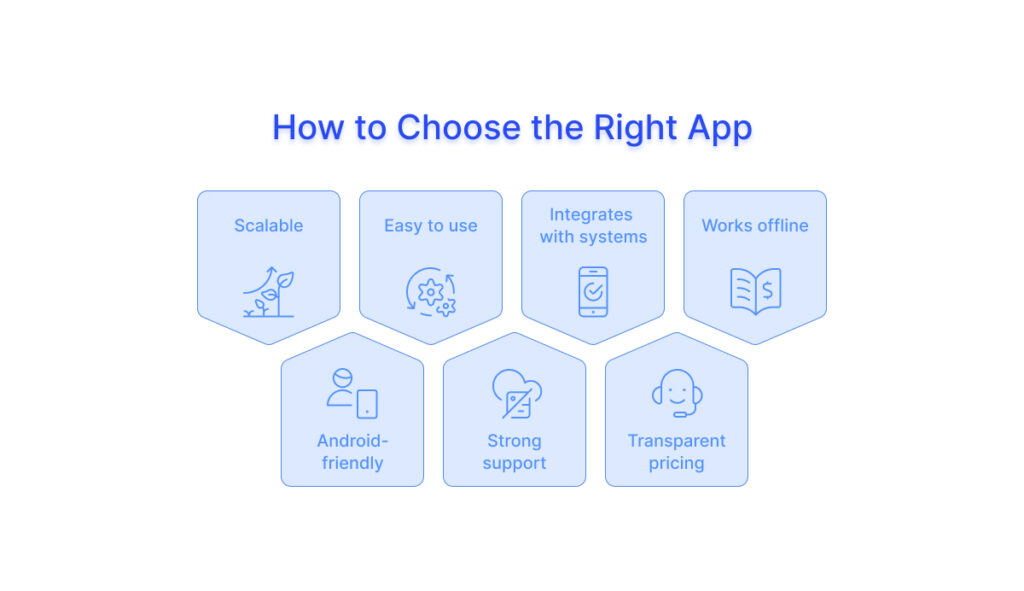
There are many brand-promoting tracking apps in the market, but choosing the right one is not easy. The real challenge is knowing what to evaluate. Here’s a practical checklist to help you choose the right in-store promoter and management app for your business:
1) Scalability- will it grow with you?
The app should work not just for your current team, but also when you scale. What works for 50 promoters should continue to perform smoothly for 500 or more. As your business grows, your in-store operations become more complex. The system should handle more users, more data, and more locations without slowing down or requiring major changes.
What to look for:
- Proven usage at large scale
- Ability to handle high data volume
- Flexible setup for roles, territories, and hierarchies
2) Ease of Use for product promoter staff
Promoters need something simple and easy to use. If the app is confusing, they won’t use it properly, and your data quality will suffer. The app should help them complete tasks quickly without extra effort. Easy adoption is critical for success.
What to look for:
- Clean, simple interface
- Local language support
- Minimal steps to complete tasks
- Quick onboarding and training
3) Integration With Existing Systems
The app should connect with your existing systems, like ERP or Distribution Management System. If it doesn’t, you end up with disconnected data and more manual work.
A well-integrated system ensures that data flows directly into your business systems, making reporting and decision-making faster and more accurate.
What to look for:
- Ready integrations with DMS/ERP
- API support for custom connections
- Smooth data flow from the store to backend
4) Configuration Flexibility
Your In-store retail operation processes will keep evolving. The app should allow you to quickly update forms, workflows, beat plans, and task structures without heavy dependency on the vendor.
If every small change requires technical support or long turnaround times, the system becomes rigid and slows down your operations.
What to look for:
- Easy configuration of forms and checklists
- Ability to modify workflows without coding
- Quick updates to beat plans and task structures
- Minimal dependency on the vendor for changes
5) Data Portability & Vendor Lock-in
Your data should always be easy to access and move, no matter which app you use. Some systems make it hard to export or shift your data, which can tie you to one vendor for the long term. This becomes a problem if your needs change or the app no longer works for you.
What to look for:
- Easy ways to export your data
- Clear understanding of who owns the data
- APIs or options to access your data anytime
6) Customer Support Quality
When issues happen, support needs to be fast and reliable. Delays can affect your entire operation in the store, especially during peak days.
A strong support system ensures that problems are resolved quickly, and your teams can continue working without disruption.
What to look for:
- Dedicated account manager
- Fast response times (clear SLAs)
- Strong client references
7) Pricing & Total Cost
The monthly or yearly subscription is only part of the cost. You also need to consider setup, training, integrations, and any additional modules.
Understanding the full cost upfront helps you avoid surprises later and make a better long-term decision.
What to look for:
- Clear pricing with no hidden costs
- What’s included vs extra charges
- Total cost over 12–24 months
Choosing the right in-store promoter and management app is not just about features. It’s about finding a solution that fits your operations, scales with your growth, and works reliably in real-world conditions.
Implementation Best Practices - How to Roll Out an In-Store Promoter & Management App Successfully
Choosing the right in-store promoter app is the first decision. Making it work across a geographically spread retail execution team is the real challenge. Most implementations that underdeliver do not fail because of the technology – they fail because of how it was introduced.
Here is what a successful rollout looks like.
1) Plan a Gradual Rollout
Avoid launching across all locations at once. Start with a smaller group or region, test the workflows, fix issues, and then scale step by step. Rolling out in phases helps you identify gaps early and ensures a smoother expansion across geographically spread teams.
For example, if you are rolling out for 100 promoters across 3 distributors, 12 sub-distributors, and 200 outlets, a phased rollout would look like this:
Week 1–2:
Set up the system, configure workflows, define beat plans, and train a core group (say 15-20 promoters and 2-3 managers).
Week 3–4:
Run a pilot in one distributor network covering around 40–50 outlets. Identify gaps in workflows, reporting, and usability, and fix them quickly.
Week 5–8:
Expand to the remaining distributors and sub-distributors in phases. Increase coverage to 100–150 outlets while continuing training and support.
Week 9–12:
Complete rollout across all 200 outlets and 100 promoters. Start tracking KPIs closely and refine execution based on real usage data.
This approach helps you catch issues early, avoid large-scale disruption, and ensure the system works smoothly before full deployment.
2) Address “Spy App” Concerns Early
Some promoters may feel the app is being used to track or monitor them. This can slow down adoption if not handled properly. Explain that the goal is not to monitor, but to make their work visible. In manual systems, good performers often go unnoticed. The app ensures their effort is recognised. Also, highlight that they can track their performance and incentives in near real time, so they know exactly what they need to do to earn more.
3) Plan for Data Migration Early
Most brands already have data spread across Excel sheets, WhatsApp groups, or distributor records. Ignoring this creates confusion during rollout.
Decide what historical data needs to be carried forward and what can be left behind. Even a basic migration of recent data helps maintain continuity in reporting and avoids starting from zero.
4) Train for the In-store Execution, Not the Classroom
Promoters should be able to use the app on their own phone, short local-language videos for quick learning, and pair new users with experienced promoters for the first two weeks. Also, managers should check in daily during the first month to support anyone who is struggling before it becomes a habit.
5) Set Clear KPIs Before Going Live
Define what success looks like before rollout. This could include task completion rates, store coverage, reporting accuracy, or sales tracking. Set realistic targets and review them weekly in month one, fortnightly from month two. Having clear KPIs ensures everyone understands expectations and helps measure the impact of the app from day one.
6) Monitor Adoption Closely
Track how actively the app is being used. Look at logins, task completion, check-ins, and data quality to identify gaps. Early monitoring helps you spot issues quickly and take corrective action before they become bigger problems.
7) Continuously Optimise
Implementation doesn’t end after rollout. Regularly review performance, gather feedback from retail execution team, and improve workflows. Small improvements over time lead to better efficiency, higher adoption, and stronger results from the platform.
Following these best practices ensures that your in-store promoter and management app delivers real value, not just as a tool, but as a system that works in real-world FMCG conditions and improves execution across your entire Retail Execution operation.
Emerging & Advanced Capabilities - What Leading Brands Are Already Moving Towards
The core features of an in-shop field promoter tool and management platform – attendance tracking, shelf audits, task management, sales capture – are now table stakes. The brands pulling ahead are going further. These are the advanced capabilities already being adopted by leading consumer goods companies, and increasingly available in mature retail execution platforms today.
1) AI-Powered Shelf Image Recognition
Advanced platforms analyse shelf photos automatically using AI. As soon as a photo is uploaded, the system detects out-of-stocks, incorrect facings, planogram issues, and competitor presence – without waiting for manual review.
2) Predictive Analytics & Smart Recommendations
Platforms now go beyond reporting and start predicting outcomes. By analysing past data like store visits, sales trends, and stock patterns, they highlight risks and suggest actions before problems occur.
3) Automated Reporting & Smart Dashboards
Reports are generated automatically without manual effort. Territory performance, campaign results, and promoter scorecards are available instantly, without waiting for back-office compilation.
4) Integration With Retail Intelligence Platforms
Retail execution data relates to other data sources like distributor sales, market data, and e-commerce insights. This gives a more complete view of performance across channels.
5) Gamification & Dynamic Incentive Engines
Modern platforms use gamification like leaderboards, daily targets, and instant rewards to keep promoters engaged. Performance tracking becomes more interactive and motivating.
These capabilities are not future ideas. They are already being used by leading platforms today, and the gap between brands using them and those relying on basic tools is growing fast. When choosing a Heera’s in-store promoter and management app, don’t just look at what it can do today. Also consider how it will evolve. A platform that is investing in AI, analytics, and smarter integrations will continue to add value as your business grows. One that isn’t evolving may need to be replaced sooner than expected.
Heera In-store execution has always been the final frontier of retail strategy. Brands invest heavily in products, marketing, and trade, but the real impact depends on what happens on the shelf every day. For many brands, this last mile has remained invisible for too long. An in-store promoter app and management app change that. Promoters know exactly what to do at every store, managers get clear visibility into execution, and decisions are based on real ground data, not assumptions. Better execution. Better control. Better results.
Heera Software brings all of this together in one connected platform built for Indian field operations – from attendance tracking and shelf audits to sales capture and compliance dashboards. Book a free demo with Heera Software to see how it can work for your team, your stores, and your goals.
Frequently Asked Questions
An in-store promoter app is a mobile application used by Brand product promoters inside retail stores to manage daily tasks like attendance, shelf audits, sales tracking, and photo uploads. It helps brands capture real-time, location-verified data from stores and improve visibility into execution.
An in-store management app is a platform used by managers and the Headquarters teams to monitor in-floor retail activities, track store-level execution, analyse performance, and make data-driven decisions across multiple outlets in near real time.
CPG/FMCG brands need an in-store promoter app to track store-level execution, prevent fake attendance, monitor shelf visibility, capture secondary sales data, and ensure that promotions and displays are implemented correctly across all outlets.
The best in-store promoter app depends on your scale, outlet coverage, and execution needs. FMCG brands typically look for solutions that offer real-time tracking, shelf audits, sales capture, and integration with DMS or ERP systems.
Promoter performance is tracked using metrics like attendance, task completion, sales contribution, audit scores, and compliance levels, all captured through in-store apps and visualised in dashboards.
It improves sales by ensuring better product visibility, faster detection of out-of-stock items, consistent execution of promotions, and improved promoter productivity. When execution improves at the store level, conversions and secondary sales increase directly.
In-store promoter apps use GPS-based, geo-tagged attendance, check-ins and time stamps. This ensures that promoters can only mark attendance when they are physically present at the assigned store location.
No, CRM systems are not designed for in-store execution. They focus on customer relationships and sales pipelines, while in-store execution app are built specifically for tracking activities, audits, and performance inside retail stores.
Pricing varies depending on the number of users, outlet coverage, features, and integrations. Most solutions are priced on a per-user or per-outlet basis, and costs increase with scale and complexity of deployment.
A promoter app integrates with a distributor DMS through APIs or data sync, enabling real-time sharing of stock, orders, and outlet data.
Data such as stock levels, orders, outlet lists, and sales information flows between the promoter app and the DMS.
Yes, most promoter apps can connect with existing DMS or ERP systems through API-based integration.
The best In-store promoter tracking app for FMCG in India is one that gives you real-time visibility, strong retail execution control, & seamless order tracking across your distribution network.
Yes. An in-store promoter app delivers training through short videos, product guides, and campaign updates directly in the app. Promoters receive this content along with their tasks, ensuring they know exactly what to do in-store. Some apps also track content views or include quick checks to confirm understanding.